grep -r on the same 1.4 GB, which takes 16 s and only lists file namesMeasured on a MacBook against one developer's real Claude Code history: 1.4 GB of transcripts.
Claude Code remembers everything. Finding it is the hard part.
Every session is saved on your disk as a raw transcript file. Useful, until you need to find one.
Your computer crashed mid-work
Five sessions were open in three projects. Which one was fixing the checkout bug, and what was its ID?
--resume shows titles, not answers
The built-in picker lists session titles for the folder you're in. It doesn't show what a session changed, which PR it opened, or what it cost.
"Where did Claude explain that?"
The answer is in a transcript from last Tuesday, somewhere among hundreds of megabytes of JSON.
No idea what a session did
Which files did it change? Which PR did it open? Did it make a worktree? How much did it cost?
claude-gui answers all four. It reads the transcripts already on your disk and turns them into a dashboard you can search, browse and resume from.
Everything a session did, on one page
Nothing to configure. It finds every project you've used Claude Code in on its own.
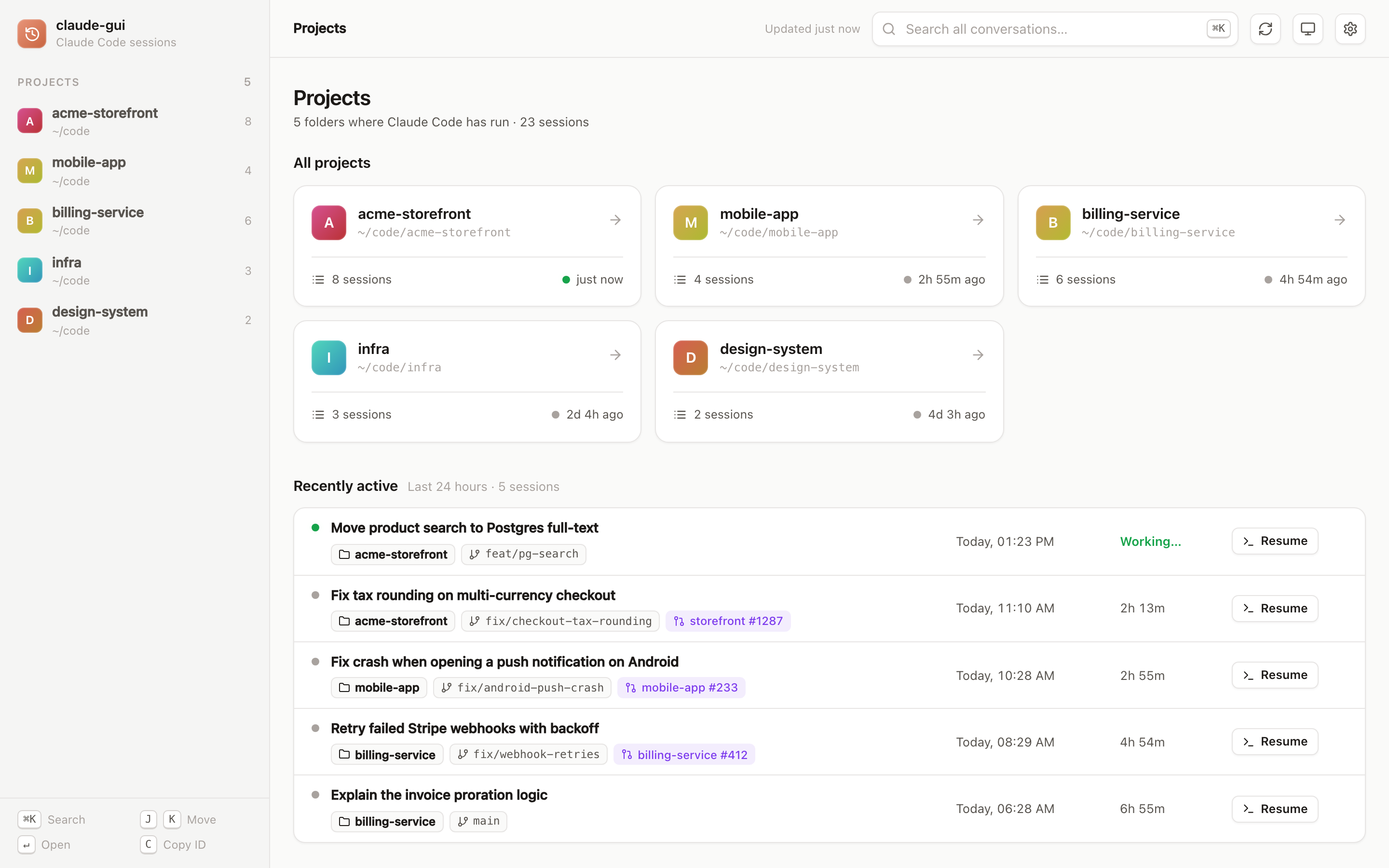
See what you were working on, at a glance
The home screen lists every project you've used Claude Code in, with the sessions active in the last 24 hours right below, each with a one-click Resume.
- Recently active sessions from every project, newest first
- The branch and pull request for each session, right on its row
- A live "Working…" status while Claude is still replying
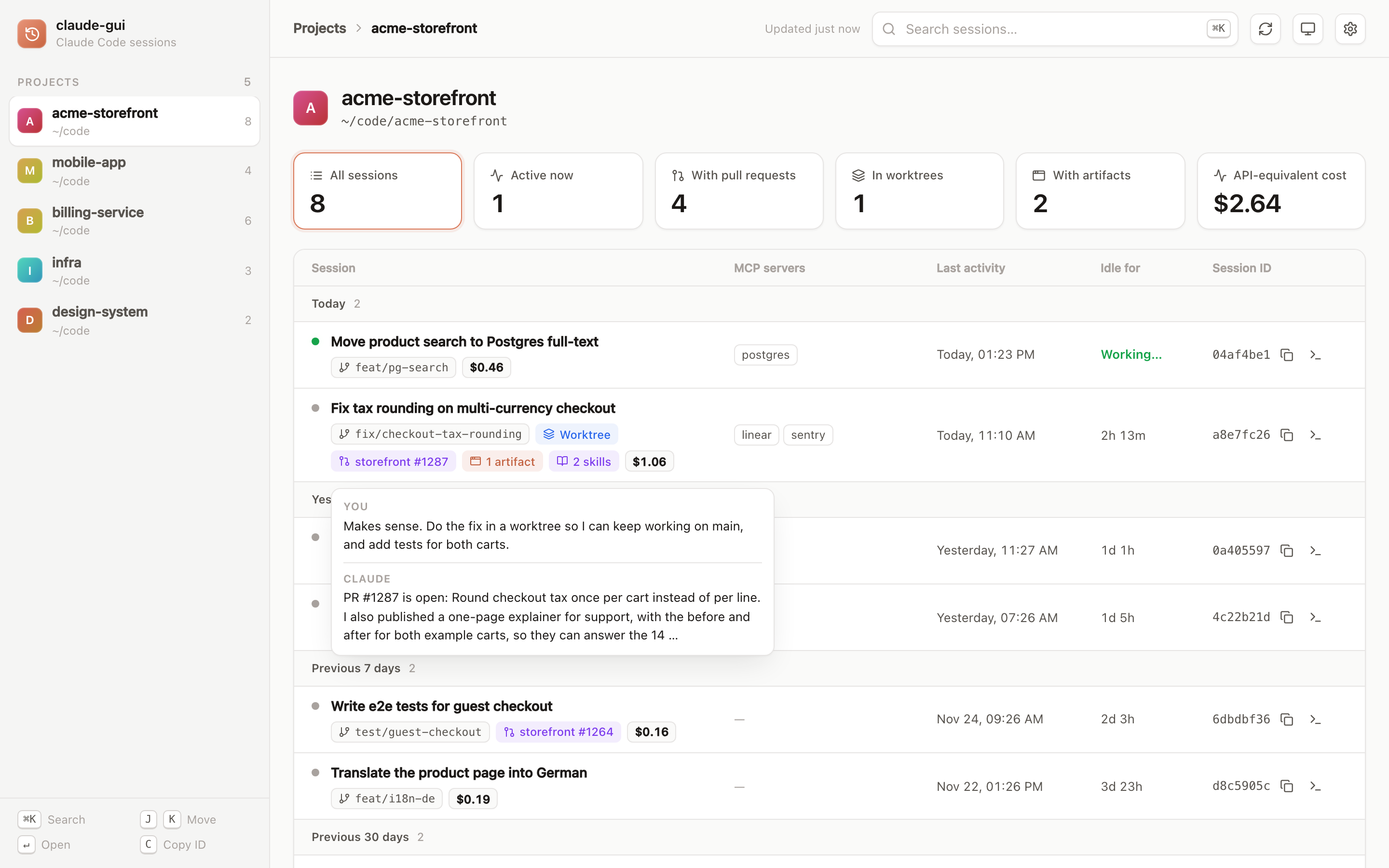
Hover a session to see your last prompt and Claude's last reply
Each project lists its sessions by day. Hover any one and a card shows exactly where it stopped, so you can tell sessions apart without opening them.
- Stat tiles that filter by active now, with PRs, in worktrees or with artifacts
- The estimated cost of each session and of the whole project
- Copy a session ID or resume it straight from the list
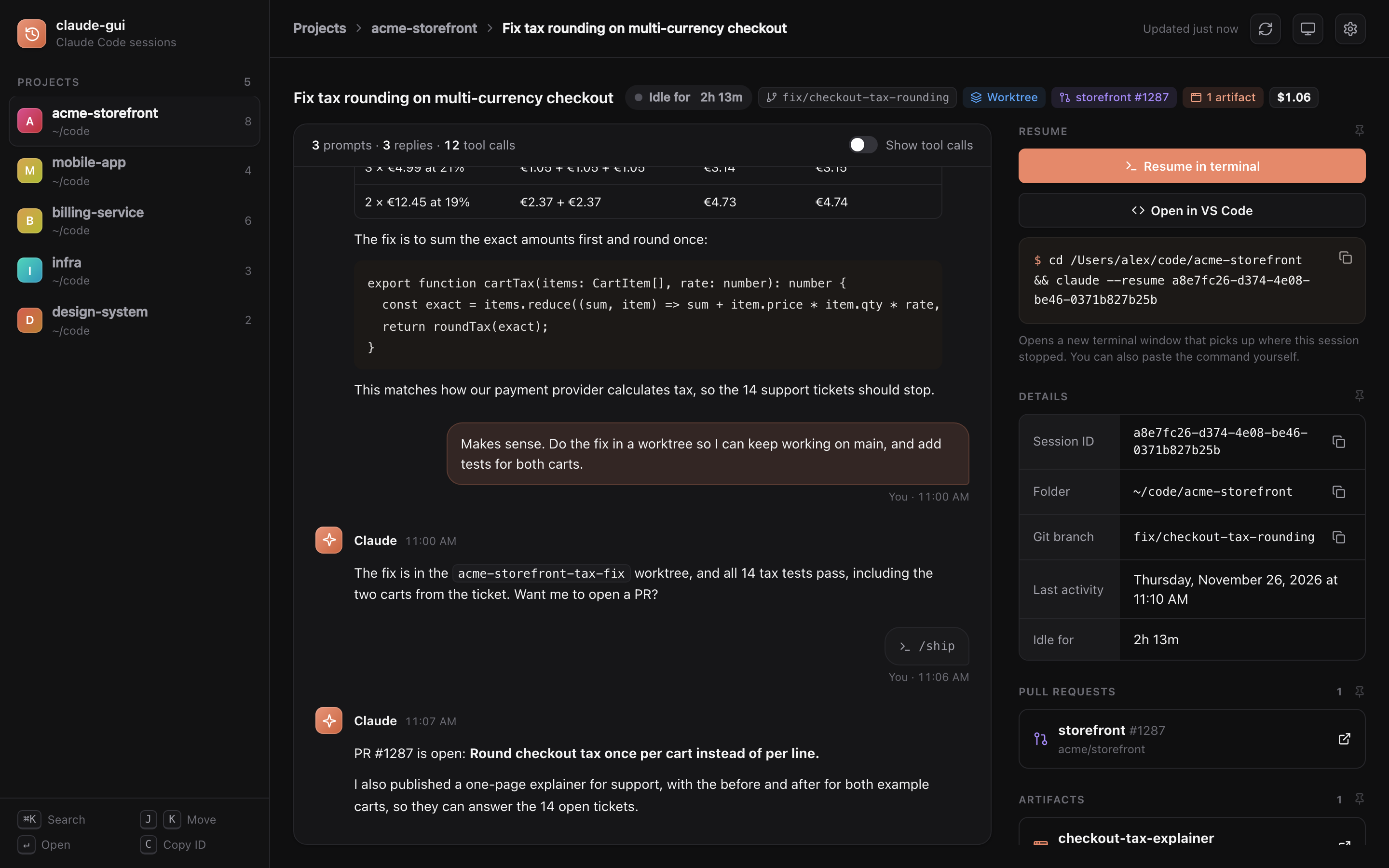
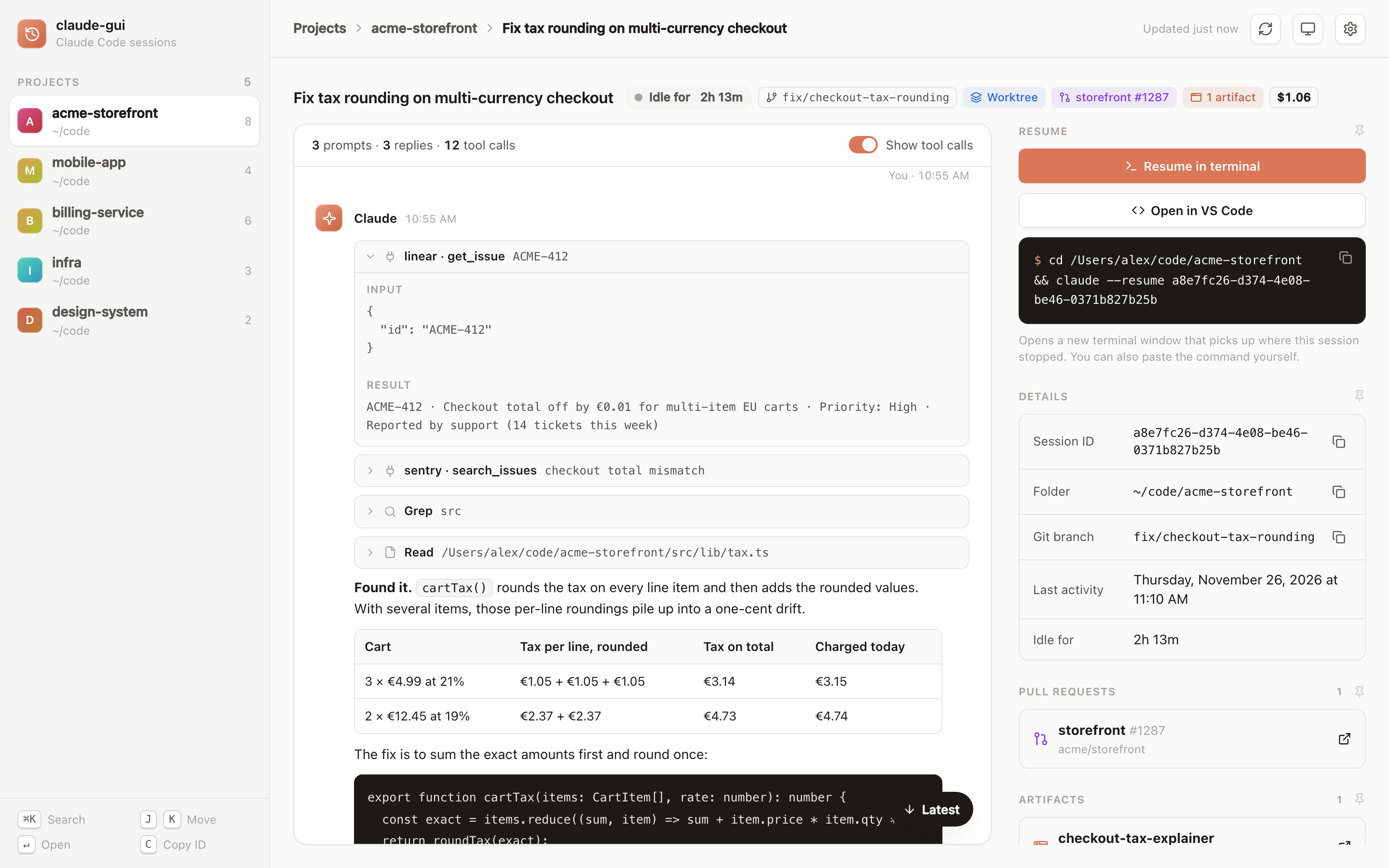
Read the whole conversation, the way you had it
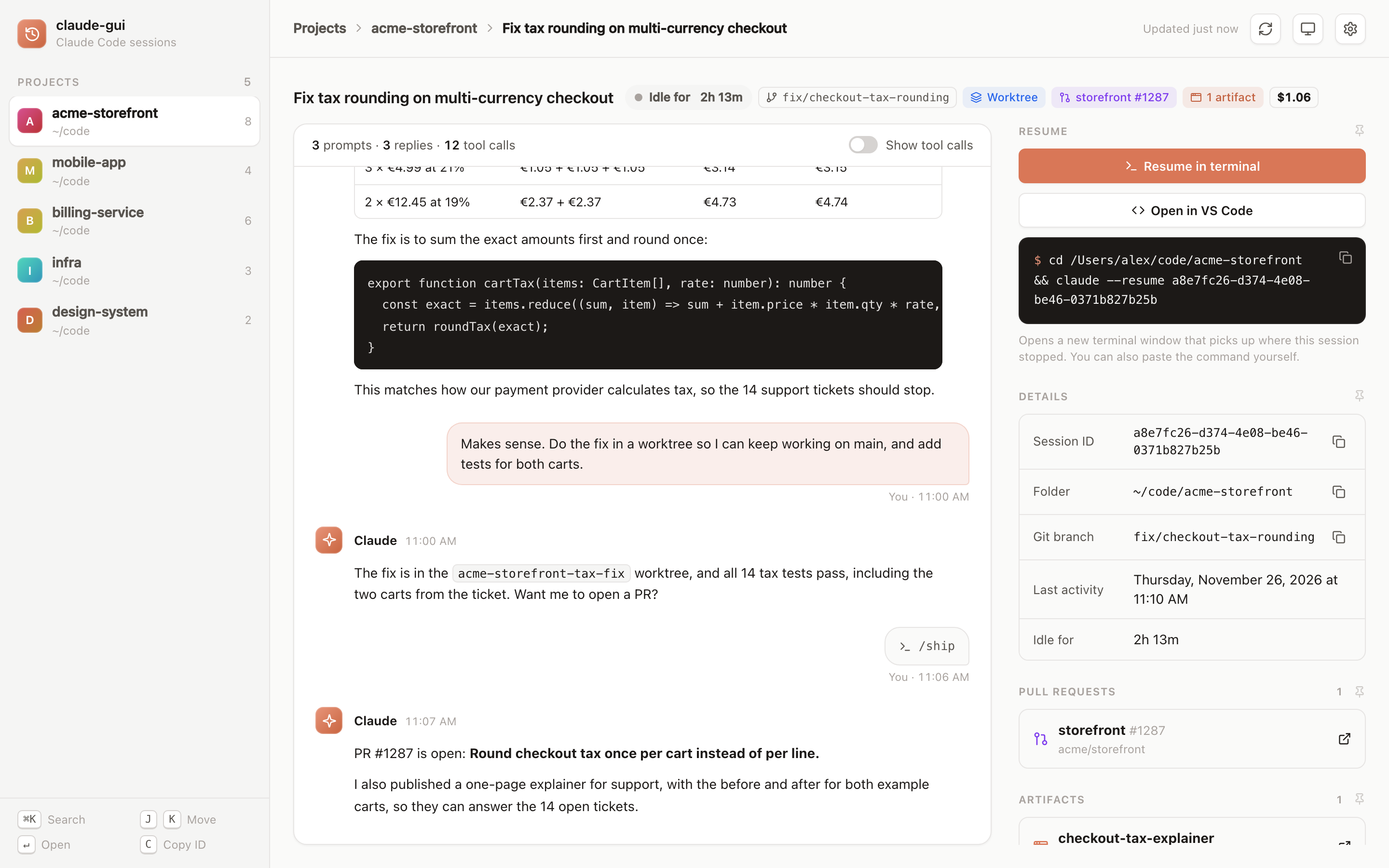
Open a session to read everything you and Claude said. Replies are rendered as markdown, with tables and code blocks. It opens at the latest message.
- Tool calls stay hidden until you want them, then expand to show their input and output
- Slash commands, background tasks and context summaries are shown in place
- A copy-ready
claude --resumecommand next to the chat
See which files changed, and what the session cost
Every edit Claude made is listed by file, with a diff of what it replaced. A usage box shows tokens and an estimated cost at Anthropic's API list prices.
- Per-file diffs, hidden behind an Expand button until you need them
- Output tokens, cache reads and writes, and the models used
- Pin the boxes you care about to the top of every session page
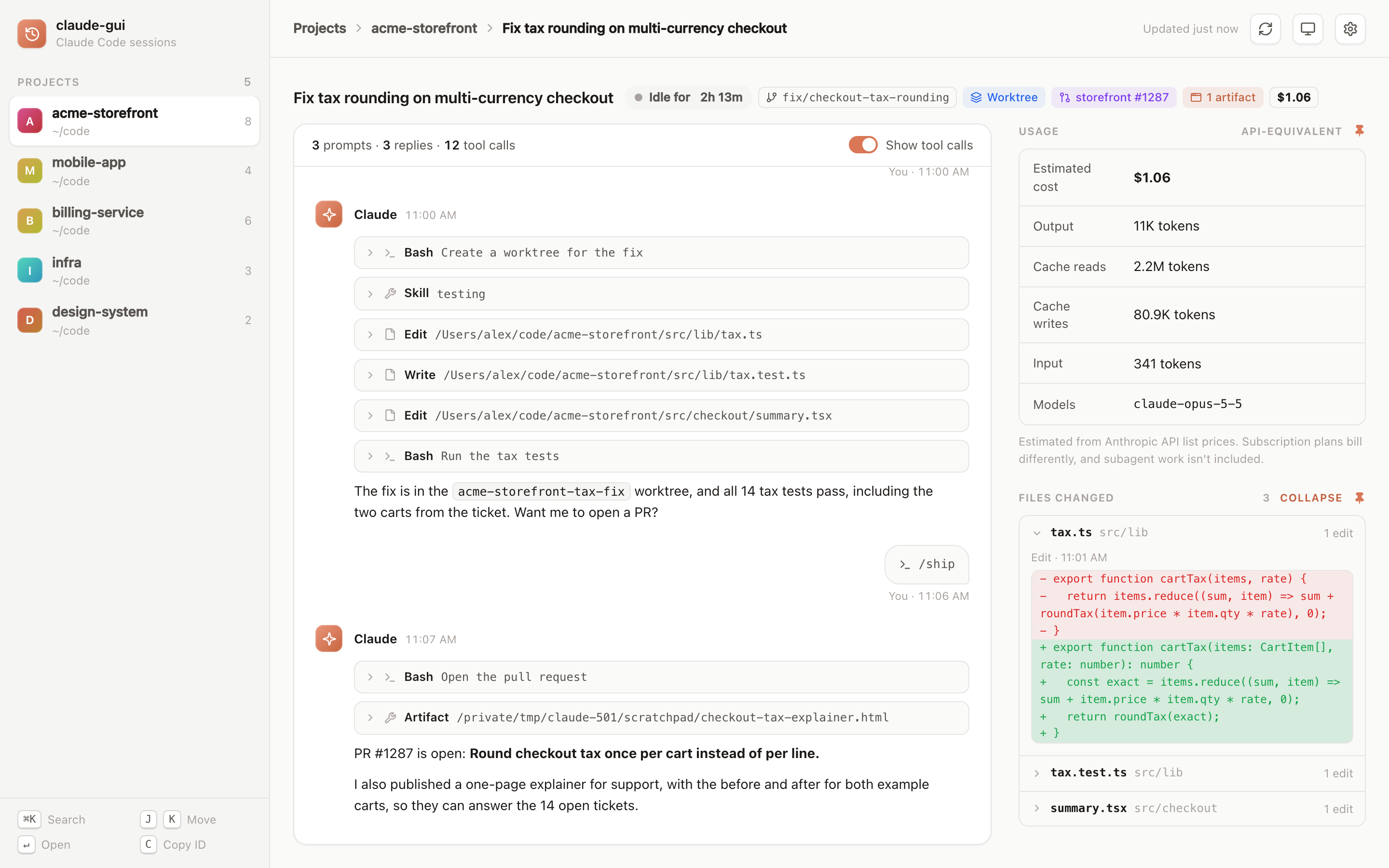
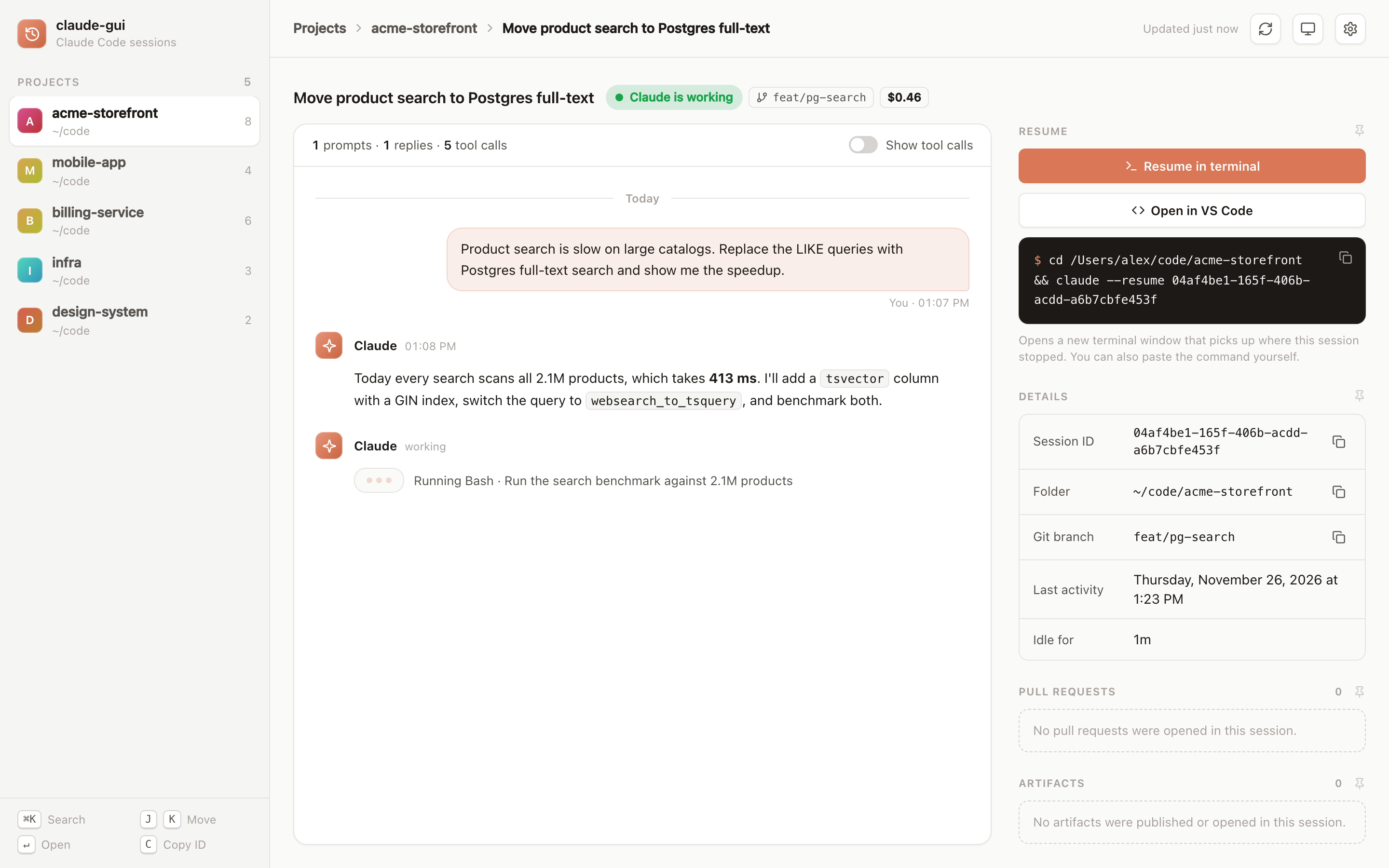
Watch running sessions, and get pinged when one needs you
While Claude is working, the session page shows what it's doing right now. Your computer tells you when a session finishes or asks you something, and clicking the notification lands you on that session. It's on by default; your browser just asks for permission once.
- A desktop notification when a session finishes, asks you a question or has a plan for you to approve
- One click on the notification opens that session
- "Needs you" on every session that's waiting for your answer
- Keeps your place: it only follows new messages if you're at the bottom
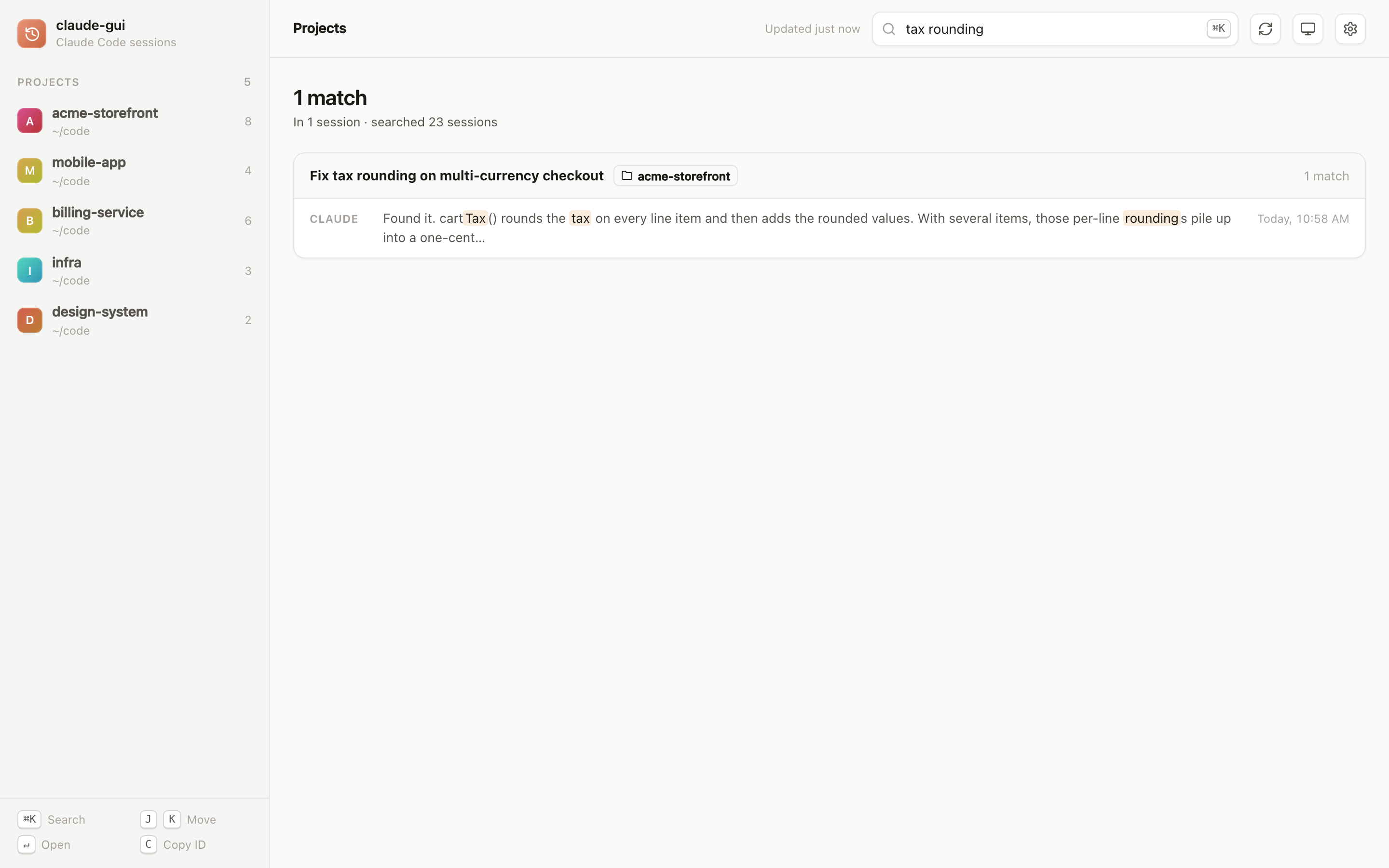
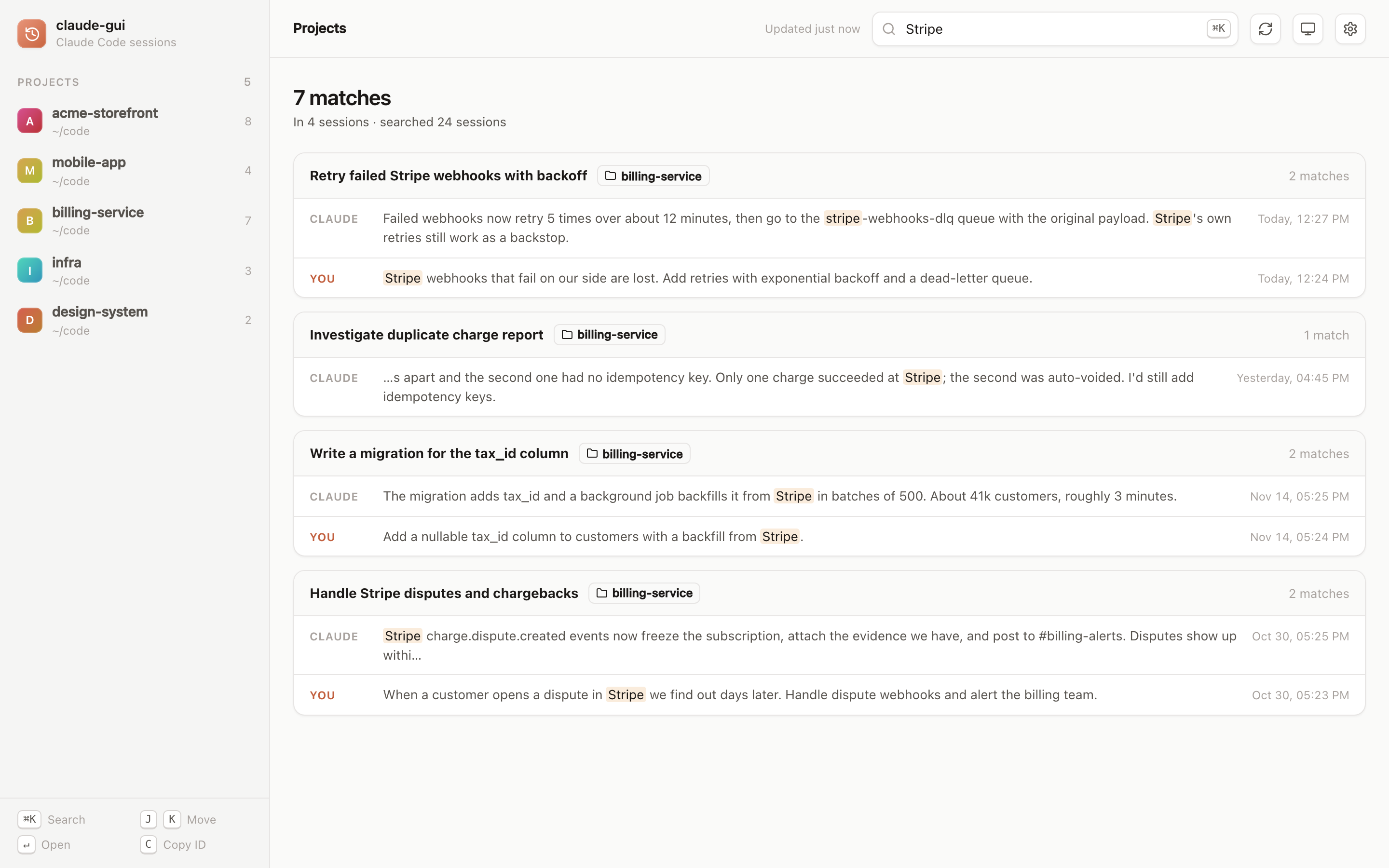
Search every conversation on your disk
Type in the search box to find any word you or Claude wrote, across every project. Results jump straight to the session.
- Matches highlighted in context, with who said it and when
- Searches prompts and replies, not just titles
- ⌘ K to search from anywhere
Jump back in, in your terminal or your editor
One click resumes the conversation in a new terminal window, already in the right folder. Another opens the session's folder, or any of its worktrees, in your editor, so you can look at the code Claude changed.
- Terminal, iTerm2, Ghostty, WezTerm, kitty and Alacritty on macOS, plus GNOME Terminal, Konsole and Windows Terminal. It asks which one the first time
- VS Code, Cursor, Zed, Windsurf, Sublime Text, PhpStorm, WebStorm and IntelliJ IDEA
- Only opens the session's own folders, never a path a web page asks for
Pick up last month's work with all its context
Starting something related to a task from weeks ago? Find that session and click Resume. Claude continues the same conversation, with the code it read, the decisions you made and the dead ends you already ruled out. No explaining it all again.
- Search the words you and Claude wrote, not just titles, back to the oldest session on your disk
- The branch, PR and your last prompt on each row, so you resume the right one
- Older than Claude Code's 30-day cleanup? claude-gui kept a copy, so it's still there
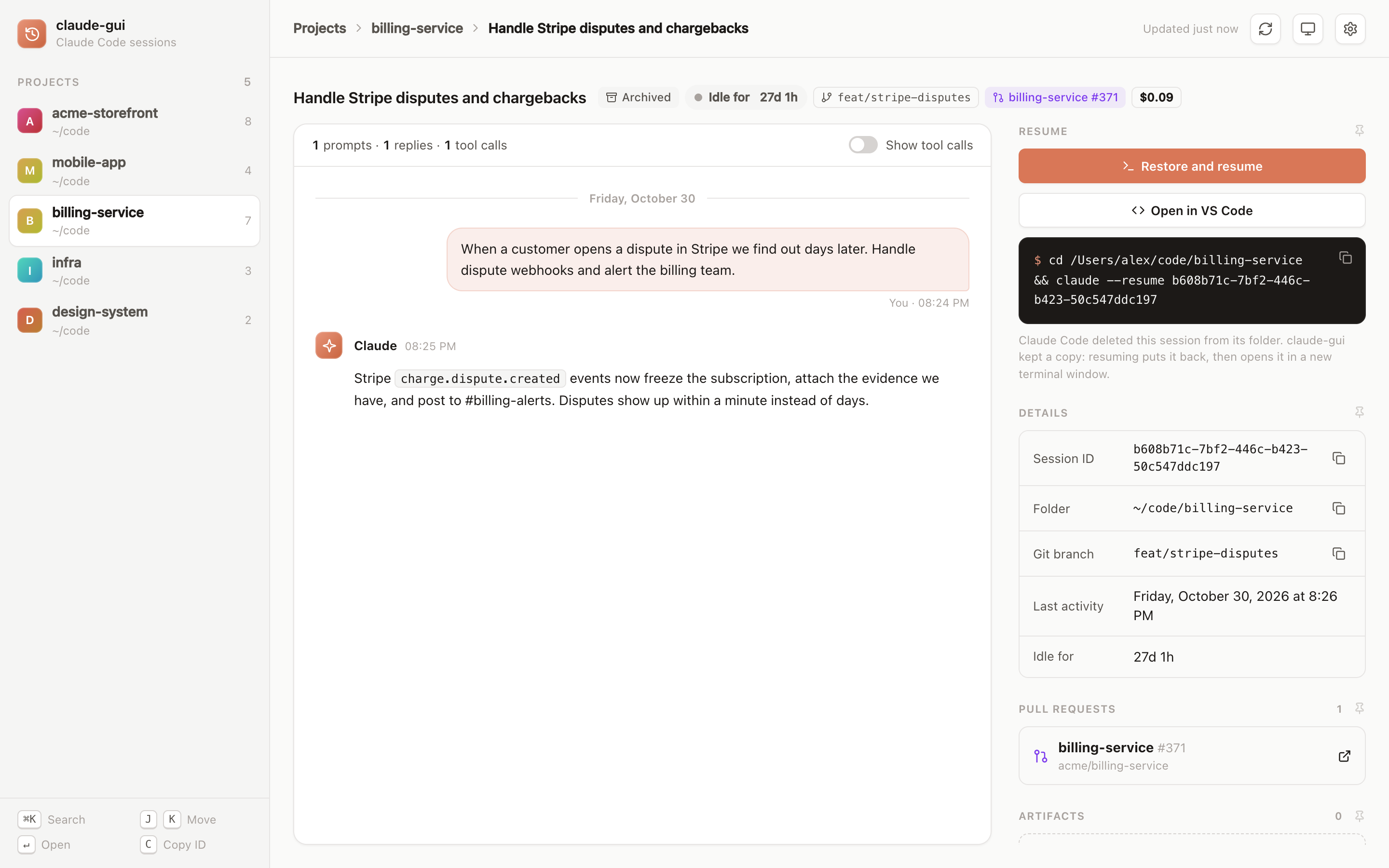
Keep every session, even after Claude Code deletes it
Claude Code deletes a session once it has gone 30 days without use. claude-gui keeps a compressed copy of every session, so old ones stay in your lists and your search. When you need one again, Restore and resume puts it back into Claude Code and opens it.
- On by default. Keep copies forever, or for as many days as you choose in Settings
- Archived sessions show up in lists and search like any other
- Copies are compressed and readable only by you
- Restoring never overwrites a session Claude Code still has
The questions you ask after a long day, or a crash
claude --resume, and guess from the titlesgit worktree list and remember which is whichThe details that matter after the fact
Same context, weeks later
Resume an old session and Claude remembers everything you worked out together.
Pull requests
Every PR a session opened, linked straight to GitHub.
Git worktrees
Worktrees a session created or entered, and whether they're still on disk.
Artifacts
Pages Claude published to claude.ai, marked as created, updated or opened.
Skills
Which skills ran, and whether you typed them or Claude loaded them.
MCP servers
Every MCP server a session called, like Linear, Sentry or GitHub.
Pinned boxes
Pin the details you check most so they're at the top of every session.
Settings and shortcuts
Set your Claude folder, editor and port once. Search, move and open without the mouse.
Your sessions never leave your machine
Your transcripts hold everything you and Claude wrote: code, secrets in logs, customer data. claude-gui treats them that way.
- Never changes or deletes the files Claude Code saved
- Keeps its copies of your sessions compressed and readable only by you
- Listens on 127.0.0.1 only, so other computers can't reach it
- Rejects requests from other websites, even ones open in your browser
- Makes no network calls and has no telemetry or accounts, so nothing leaves your machine
- Zero dependencies, so there's no third-party code to audit
Install, run and contribute
Up and running in under a minute. All you need is Node.js.
Quick start
You need Node.js 18.3 or newer and at least one Claude Code session on this machine. Then run:
$ npx claude-guiYour browser opens at http://127.0.0.1:4321. Pick a project, open a session, and click Resume in terminal to continue it, or Open in editor to look at its code. Choose your editor with the gear icon in the top bar. You can also copy the resume command and run it yourself:
$ cd ~/code/your-project && claude --resume 6706d7ca-3fa9-4959-af52-b15b645d097fInstall globally
To have the claude-gui command always available, for example right after a crash:
$ npm install -g claude-gui
$ claude-gui
To update, run the install command again. To remove it, run npm uninstall -g claude-gui.
Options
| Flag | Default | What it does |
|---|---|---|
--port <n> | 4321 | The port to listen on |
--no-open | off | Don't open the browser on start |
--terminal <app> | terminal | On macOS, where Resume opens: terminal or iterm |
--claude-dir <path> | ~/.claude | The folder Claude Code keeps its data in |
-h, --help | Show usage |
Using a different Claude folder
claude-gui reads the projects folder inside your Claude folder, which is ~/.claude unless you moved it. To read another one, click the gear icon in the top bar, enter the folder in Settings and save. The dashboard switches right away, and the choice is remembered in ~/.config/claude-gui/config.json.
You can also set it when starting the dashboard. If more than one is set, the first one wins:
- the
--claude-dirflag, for examplenpx claude-gui --claude-dir ~/work/.claude - the folder saved in Settings
- the
CLAUDE_CONFIG_DIRenvironment variable, which Claude Code uses too ~/.claude
Projects in temporary folders, such as /tmp, are hidden.
Keyboard shortcuts
| Keys | Action |
|---|---|
| ⌘ K or / | Search |
| J / K or ↓ / ↑ | Move between projects or sessions |
| ↵ | Open the selected project or session |
| C | Copy the selected session's ID |
| Esc | Clear the search, or go back to the session list |
About cost estimates
Costs are what a session's tokens would cost at Anthropic's API list prices, including cache reads and writes. If you use Claude Code on a subscription plan, you're billed differently, so treat the number as a measure of how heavy a session was. Subagent work isn't included yet. Models without a known price show token counts only.
Troubleshooting
- "Port 4321 is in use." Another copy is already running. Open
http://127.0.0.1:4321, or start this one with--port 4400. - The page is blank after an update. The server still has the old version loaded. Stop it with Ctrl C and start it again.
- A project is missing. Check that Claude Code saved sessions in
~/.claude/projects, or setCLAUDE_CONFIG_DIR. Sessions in temporary folders are hidden on purpose. - Resume doesn't open a window on Linux. It uses
x-terminal-emulator. Copy the resume command and paste it into your terminal instead.
Contributing
Contributions are welcome. There's nothing to install, since claude-gui has no dependencies:
$ git clone https://github.com/hbakouane/claude-gui.git
$ cd claude-gui
$ npm test                        # run the test suite
$ node bin/cli.js --port 4400     # run your local copy
public/index.html is read on every request, so a reload is enough for it. Anything in src/ needs a restart.Need screenshots or a demo without showing your own sessions? Point the dashboard at a folder of fake transcripts:
$ CLAUDE_CONFIG_DIR=/path/to/fake-claude node bin/cli.js --port 4400Project structure
bin/cli.js          Command line: flags, starts the server, opens the browser
src/server.js       Local HTTP server and JSON API
src/sessions.js     Reads session transcripts: titles, PRs, worktrees, files, search
src/pricing.js      Model prices and token cost estimates
src/resume.js       Opens a terminal window that resumes a session
public/index.html   The whole web app: one file, no build step
test/               Tests, using Node's built-in test runner
Principles
- Zero dependencies. Node's standard library only, and no build step for the page.
- Local and read-only. Never write to session files, never call the network.
- Every change is tested. Add or update a test in
test/for each behavior you change, including edge cases and failures. - Forgiving parsing. Transcripts can be half-written after a crash, or come from older Claude Code versions. Skip what you can't read; never fail the whole page.
Pull requests
- Create a branch from
main. - Keep commits small, with one change each, using conventional commit titles such as
feat:,fix:ordocs:. - Make sure
npm testpasses. - Open a pull request that explains what changed and why. Add a screenshot for anything visual.
Questions
Does claude-gui send my code or conversations anywhere?
No. It reads files on your disk and serves them to your own browser on 127.0.0.1. It makes no network calls, and it rejects requests from other websites.
Can it change or delete my sessions?
No. It never changes or deletes them, and it acts only when you click Resume or Open in editor. The one time it writes in Claude Code's folder is Restore and resume, which puts back a session Claude Code deleted, and never over one that's still there.
Does Claude Code delete my old sessions?
Yes. By default, Claude Code deletes a session once it has gone 30 days without use (its cleanupPeriodDays setting). claude-gui keeps a compressed copy of every session in ~/.local/share/claude-gui/archive, readable only by you, so you can still read, search and resume them. In Settings you can keep copies forever (the default), keep them for a number of days, or turn this off.
Is the cost what I actually paid?
Only if you pay for the API by the token. On a subscription plan, the number is what the same tokens would cost at API list prices. That's still a good way to see which sessions were heavy.
Does it work on Windows and Linux?
Yes. Browsing, search and every detail work everywhere Node.js 18.3+ runs. One-click resume opens the terminal you choose: Terminal, iTerm2, Ghostty, WezTerm, kitty or Alacritty on macOS; your default terminal, GNOME Terminal, Konsole, Ghostty, WezTerm, kitty or Alacritty on Linux; Command Prompt or Windows Terminal on Windows.
How is it different from claude --resume?
Use claude --resume when you know the folder and the session. claude-gui is for when you don't: it shows every project at once, searches what was said, and shows what each session changed before you reopen it.
Does it use any tokens?
No. claude-gui reads the transcripts on your disk and never calls a model, so browsing, searching and reading sessions costs nothing. Asking Claude Code to find old sessions for you does: in one real test, finding two sessions took 9 tool calls and about 970,000 tokens. Each session page also shows its own input, output and cache tokens, so you can see which sessions are heavy.
Is it fast with a lot of history?
On a real 1.4 GB history with 256 sessions, a project with 92 sessions opens in 3 ms. The first search over everything takes about 3.6 s, and later searches take under 0.1 s. Once it has searched everything and opened the largest session, it uses about 310 MB of memory.
Is this made by Anthropic?
No. claude-gui is an independent open-source project. It isn't affiliated with or endorsed by Anthropic.
Never lose a session again
Run one command and your whole Claude Code history is searchable. It stays on your machine.
Free and open source under the MIT license. Zero dependencies.